Opening your PDF…

Auto-redact sensitive PDFs. Without uploading a single page.

KeptPDF automatically marks SSNs, account numbers, emails, and phone numbers right in your browser, then flags names and dates for a quick review. Clean a file before it reaches a client, a court, a vendor, or an AI tool. The whole 24-tool suite works the same way: open DevTools and watch, your file is never in a single request.

Your file and the data inside it stay 100% on your device.

25 tools
0 uploads
0 accounts required
Upvote KeptPDF on Product Hunt
No file handy? Try the flow on a demo:
keptpdf.com
Watch with sound

See KeptPDF in action.

Real output from the actual app, captured on-device. Nothing staged, nothing uploaded.

keptpdf.com/app/redact
See it live

One click finds sensitive values across your document.

Names, SSNs, medical-record and member IDs, card and routing numbers, emails, addresses and ZIP codes, dates, web links and more, flagged across dozens of categories and color-coded. Uncertain matches are held for your call (Redact or Skip) before anything is applied.

Open the app
keptpdf.com/app/redact
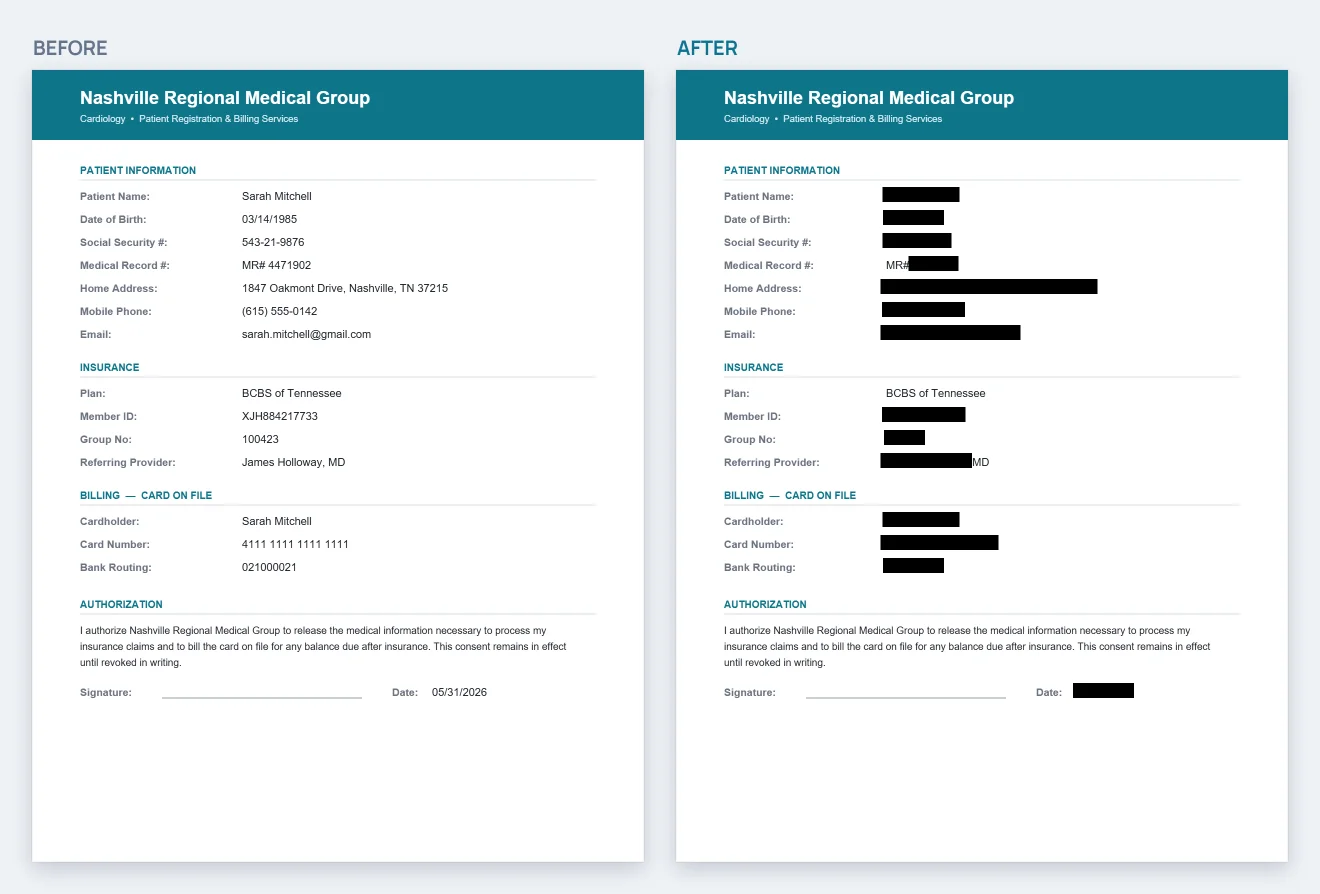
A medical intake form shown twice side by side: on the left every SSN, name, date of birth and account number is visible; on the right the same fields are struck out in solid black.
Redact

Redaction that actually deletes the text.

Auto-detect SSNs, names, dates of birth and account numbers, then truly destroy the layer underneath. No black box to copy-paste around: what you download is flattened and rasterized, with the original text gone for good.

Try redaction
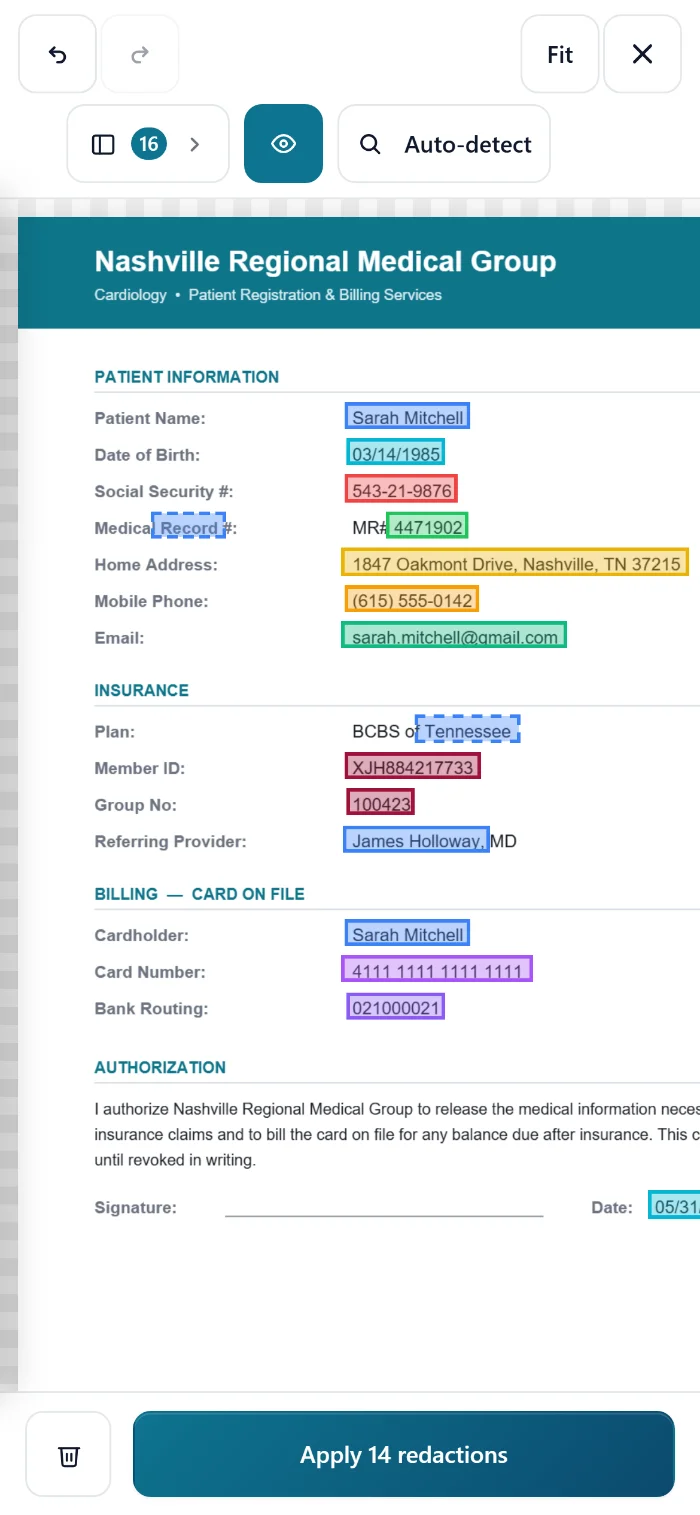
KeptPDF running in a phone browser: automatic PII detection has marked sixteen items on a form, with a two-row mobile toolbar and an Apply 14 redactions button.
Yes, on your phone

Auto-redact PII right in your phone's browser.

There's no app to install and nothing gets uploaded. The same on-device detection runs in mobile Safari and Chrome, something the big desktop tools simply can't do on a phone. Tap through each match, then redact and download.

Open the app
Redaction-Audit-Certificate.pdf
A SHA-256 redaction audit certificate PDF listing the input and output document hashes, a category-by-category breakdown of what was removed, and the safety mode used.
Prove it

A SHA-256 certificate for every redaction.

Export a verifiable audit certificate showing the input and output document hashes, exactly what categories were removed, and the safety mode used: clear, tamper-evident proof the file was sanitized, for your compliance and client records.

See a sample certificate
Redact or anonymize?

Two ways to make a sensitive PDF safe.

Both run entirely in your browser. Pick by what you are about to do with the file.

Do everything. Upload nothing.

Each tool runs entirely on your device. Drop a file, click a button, get the result.

Bulk Actions: run a tool across a whole stack of PDFs at once

One file or a hundred. Same privacy.

Bulk Actions runs the tools you already trust across a whole stack of PDFs in one pass: redact, Bates-stamp, OCR, compress, scrub metadata, watermark or password-protect. Every file is handled on your device. Nothing is uploaded, no matter how many you drop.

Open Bulk Actions  ·  Free processes 3 files per batch; Pro & Practice are unlimited.

How KeptPDF works

Three steps. Zero uploads.

1

Open your file

Drop a PDF onto the page or pick it from your device. It loads straight into your browser, with no upload step and no waiting room.

2

Work on it privately

Redact, sign, OCR, watermark, merge, split: every change is processed locally on your device. Your file is never sent anywhere.

3

Download the result

Save your finished PDF. The original never left your device, and neither did the copy.

Want proof? Open your browser's Network tab and run any tool: your file never appears in a single request. Verify it yourself

Built for the files you can't afford to leak.

No uploads, ever

Files are processed locally in your browser, so we never see your documents. Open DevTools: your file never leaves the page.

Redaction that actually works

Destroys the underlying text layer, so there is no copy-paste leakage. Outputs a SHA-256 audit certificate for your records.

Find sensitive info automatically

One click flags names, SSNs, account numbers, emails and dates, so you can review and redact before a file ever reaches the wrong hands.

No account required

Every free tool works without a sign-up. With no login or profile on the free tools, there's nothing to leak. You only create an account to buy Pro, and even that's passwordless.

No upload queue

Drop the file and processing starts the instant it lands. No upload step means no queue to wait in.

Works offline

Once the page has loaded, your tools keep working even if the connection drops, because processing happens in your browser, not on a server. (OCR downloads its engine once, on first use.)

Simple pricing. No traps.

Cancel anytime. Use what you paid for. No surprise charges.

Free

$0/forever
  • All 25 tools
  • Unlimited single-file use, no daily limit
  • Bulk actions: 3 files per batch, 5 runs a day
  • Files up to 25 MB
  • Shareable verify link for redactions
  • Small KeptPDF footer
Start free

Practice

$99/seat/month

For law firms & clinics that send court- and HIPAA-sensitive files.

  • Everything in Pro, for every member
  • Shared always-redact list every member inherits: your firm’s redaction policy, enforced
  • Team never-flag list kills repeat false positives for everyone
  • End-to-end encrypted: we can’t read your firm’s list
  • Firm-wide redaction counts · 2–25 seats on one invoice
  • Invite & manage your team · priority support

Larger team, SSO, or a BAA? Contact us

Need to clear an IT or procurement review? Read the security overview.

Questions, answered.

Straight answers about privacy, pricing, and how KeptPDF actually works.

Where do my files actually go?
Nowhere. Every KeptPDF tool runs entirely inside your browser. Your file is never uploaded to us, to a cloud, or to anyone else. You don't have to take our word for it: open your browser's developer tools, watch the Network tab, and run any tool. Your file never appears in a single request. The only calls are tiny first-party pings (the tool's name, whether you're signed in) that never contain it. See how to verify
Is it really free?
Yes. Every tool is free, with no account and no daily limit, because it all runs on your device and there's nothing for us to ration. Free handles files up to 25 MB, and the only metered thing is bulk processing many files at once (3 per batch, 5 runs a day). Pro ($29/month) removes the small KeptPDF footer, unlocks unlimited bulk, adds the downloadable redaction certificate, and raises the size limit to the largest your browser can handle, around 500 MB.
Do I need to create an account?
Not for the free tools. You only make an account if you subscribe to a paid plan, and it's passwordless (a sign-in link sent to your email, so there's no password to leak). Your documents are never part of your account. We only store what's needed for billing.
Can I use KeptPDF for privileged or confidential documents?
That's exactly what it's built for. Because your files are never uploaded anywhere, privileged exhibits, patient records, and client PII stay on your device. There is no server-side copy to breach, subpoena, or accidentally retain.
How does KeptPDF compare to Smallpdf, Adobe Acrobat, or iLovePDF?
The biggest difference is architectural: Smallpdf, Adobe's online tools, and iLovePDF upload your file to their servers to process it. KeptPDF never uploads it: every tool runs in your browser, and its redaction auto-detects PII and exports a SHA-256 audit certificate, which the others don't offer. We keep honest, side-by-side breakdowns: vs Smallpdf, vs Adobe Acrobat, and vs iLovePDF.
Is KeptPDF HIPAA compliant?
"HIPAA compliance" describes how an organization handles protected health information. It isn't a box a tool can simply check. What we can tell you is architectural: KeptPDF never receives your files, so PHI never reaches our servers in the first place. For teams whose policies require one, the Compliance Pack includes a BAA template based on HHS sample provisions to review and adapt with your counsel. More on our compliance posture
What happens to my file history?
Your recent-files list lives only in your browser (in IndexedDB) and never syncs to a server, on any plan. Clear your browser data and it's gone for good. No one else can see it.
I'm on a shared office or clinic network. Will the free limit cause problems?
Almost certainly not. The everyday tools have no daily limit, so a shared network doesn't affect them at all. Only bulk processing has a free daily cap, and it's counted per network using a one-way hash that rotates every day (we never store your IP address), so on a busy network you could hit the bulk cap sooner than expected. Pro removes it entirely.
How do I cancel, and do you offer refunds?
Pro and Practice come with a 30-day money-back guarantee: if it isn't for you, email support@keptpdf.com within 30 days and we'll refund it, no questions asked. You can cancel anytime from your billing portal. Your plan stays active through the period you've already paid for. Full terms